Integrating Odoo with other systems: the options
The four main ways to connect Odoo to other systems, when each one fits, and how to give an integration access without giving away the keys.
7 min read

Search, book and ticket flights from Odoo, then invoice and bill.
The problem it solves
Amadeus Connector brings flight sales into Odoo. Your agents search Amadeus from a flight request, quote the customer, book and record e-tickets, and finance invoices the customer and bills the ticketing vendor from the same record.
Each booking keeps its Amadeus order, record locator (PNR), segments and passengers, so anyone can see where a trip stands without opening another system.
The connector works with the Amadeus Enterprise REST APIs, using credentials Amadeus issues under your own agreement. Amadeus is a trademark of its owner. Techverse is not affiliated with or endorsed by Amadeus.
Key features
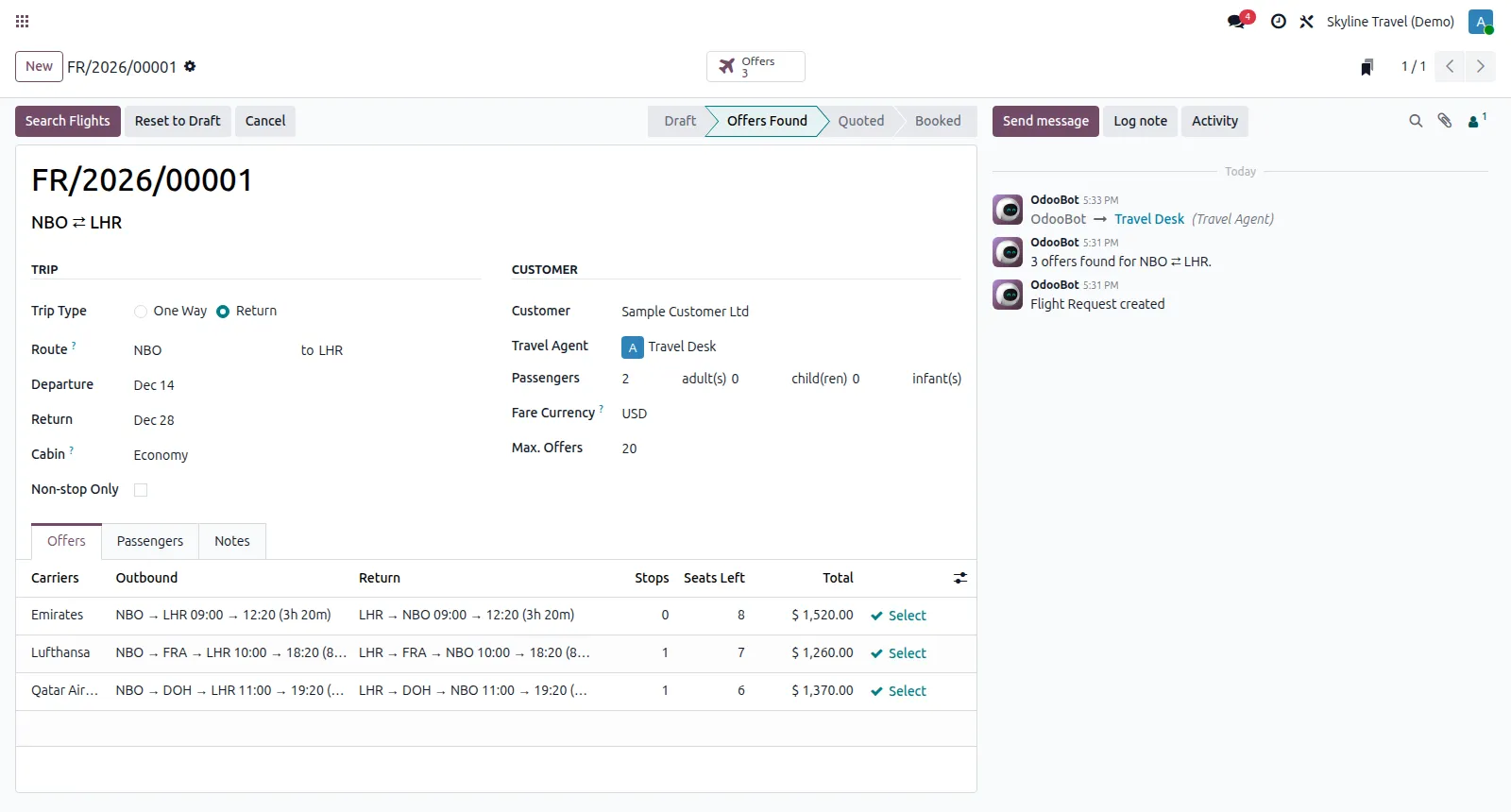
Enter the route, dates, passengers and cabin, and see live Amadeus offers with times, stops, seats left and ticketing deadline.
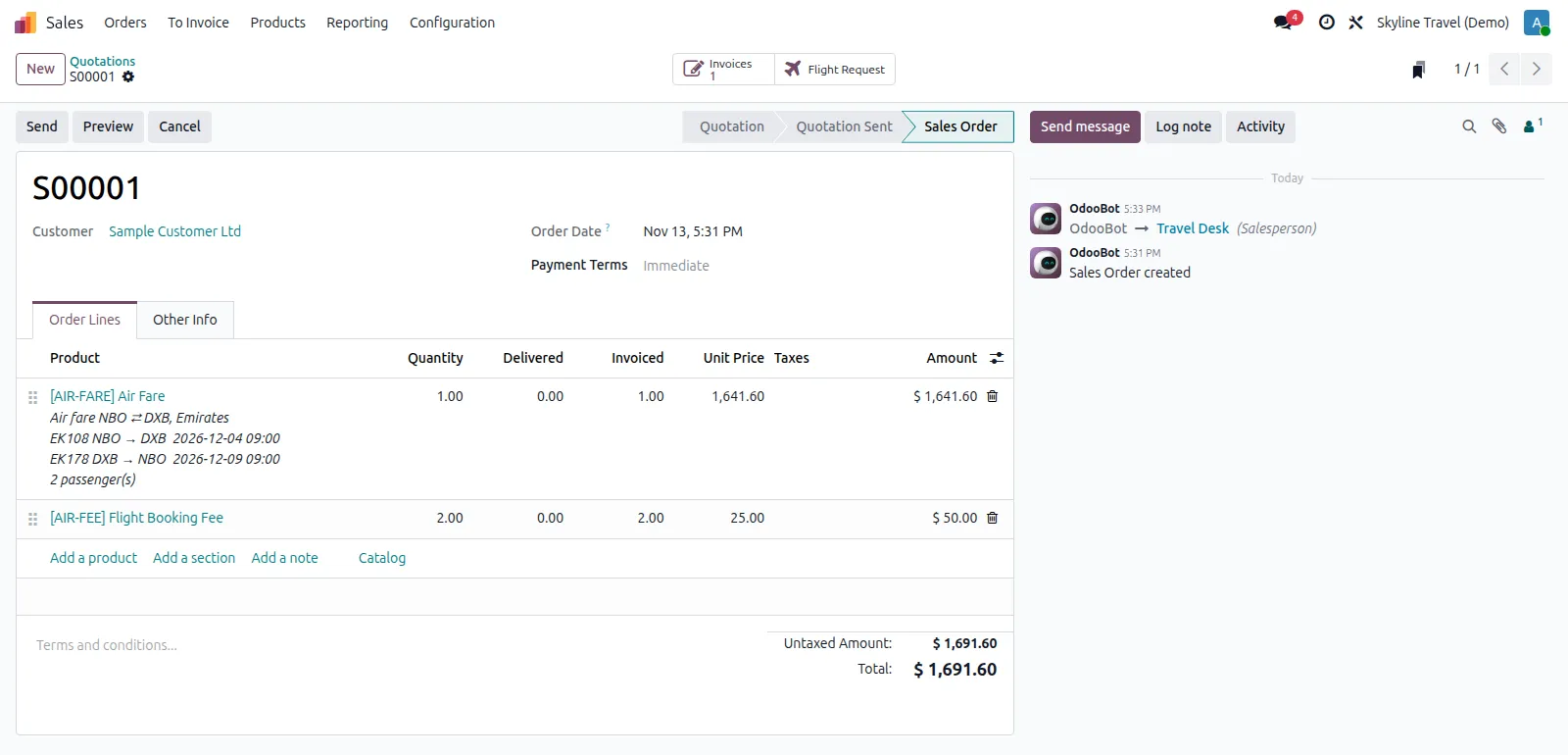
The chosen offer becomes a sales quotation with the air fare, your markup and a booking fee per passenger.
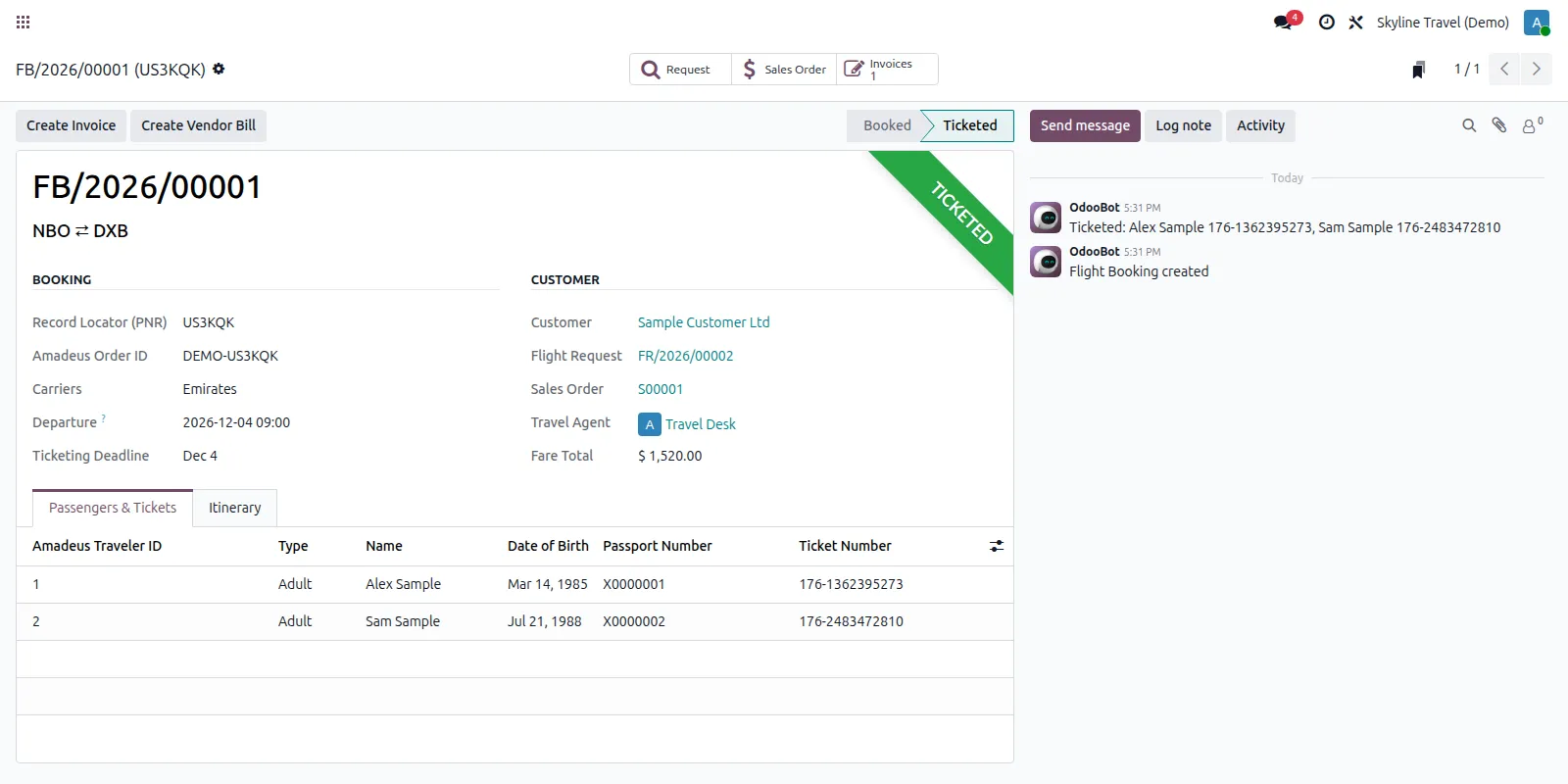
The offer is re-priced and booked on Amadeus with the passengers' passport details, and the booking keeps its PNR and segments.
Refresh reads the order back from Amadeus and stores each passenger's ticket number; tickets issued elsewhere can be typed in.
Invoice the customer from the sales order, and bill the fare from the ticketing vendor with the PNR as reference.
Environment, API credentials, markup, products, journals and ticketing vendor are set for each company.
A demo environment answers with sample offers, so your team can try the whole flow before Amadeus credentials arrive.
Travel agents search, quote and book; managers also cancel, create vendor bills and manage the connection.
How it works
Record the customer's trip and search Amadeus for offers.
Select an offer and send the customer a quotation with your markup and fee.
Once the customer confirms, add the passengers and book. Odoo stores the PNR.
Refresh the booking to record each passenger's e-ticket number.
Invoice the customer and record the vendor's bill for the fare.
Compatibility
Amadeus Connector is maintained for Odoo 18 to 20. Check the edition and the apps it needs before you plan an installation. If your set-up differs, ask us and we will tell you plainly what is possible.
Implementation and support
We install the add-on on your Odoo.sh project or server, after testing it on a copy of your database.
We set it up to match your rules, document numbering, accounts and user access.
Your users and administrators are trained on real examples, with a short written guide.
We fix issues, answer questions and keep the add-on running day to day.
When you move to a newer Odoo version, we upgrade the add-on and your data with it, tested on a copy first.
We maintain the add-on code, and any custom add-ons you already run, so they stay compatible as Odoo changes.
Questions
Yes. The connector uses the Amadeus Enterprise REST APIs, and Amadeus issues the credentials under your own agreement with them. Until then, the demo environment lets you try the full flow with sample offers.
Sales and Invoicing only, so it works on Community and Enterprise. Nothing else in your system depends on it, and it does not change your other add-ons.
Yes. Cancel Booking removes the order on Amadeus and returns the request to the quoted stage, so it can be booked again. Tickets already issued are voided or refunded with your vendor as usual.
Yes. Each company has its own Amadeus credentials, markup, journals and ticketing vendor, and users see only the requests and bookings of their own companies.
Related articles
The four main ways to connect Odoo to other systems, when each one fits, and how to give an integration access without giving away the keys.
7 min read
What each Odoo hosting option allows, how much effort it takes to run, and how to choose between them.
8 min read
Related add-ons
Run properties, tenancies, landlords and maintenance inside Odoo.
For money going out. Every payment is approved by the right people before finance pays it, with a full record.
Need help beyond this add-on? See our Odoo ERP implementation service.
Book a demo and we will show you Amadeus Connector using examples from your own business.