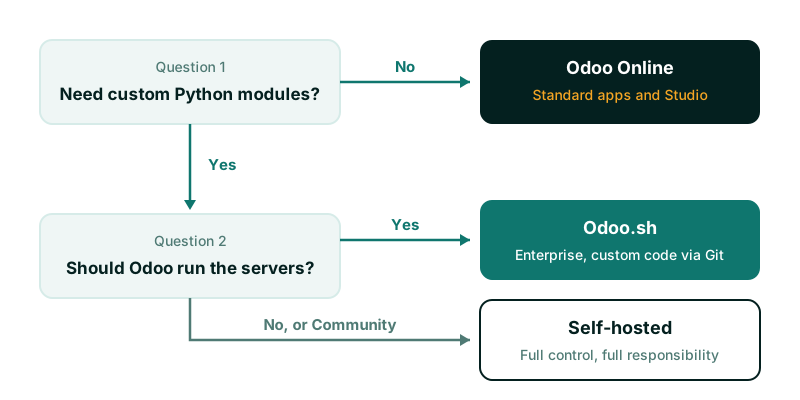
The short answer: choose Odoo Online if you can run your business on standard Odoo apps and Studio, and you never need custom Python code. Choose Odoo.sh if you are on Enterprise and need custom modules but do not want to manage servers. Choose self-hosting if you run Community, have infrastructure requirements the other two cannot meet, or want full control and have someone able to look after a Linux server, PostgreSQL and backups properly.
Most of the “odoo.sh vs odoo online” debate comes down to one question: will you ever need code that Odoo itself did not write? The rest of this post explains why, and what each option means in day-to-day practice.
The three options in one paragraph each
Odoo Online is Odoo’s software as a service. You sign up, choose apps and start working. Odoo runs the servers, applies updates and takes the backups. You do not get access to the server or the database directly, and you cannot install your own Python modules. Customisation is limited to configuration and, on plans that include it, Odoo Studio.
Odoo.sh is Odoo’s hosting platform for Enterprise customers who need custom code. Your modules live in a Git repository (GitHub), and each branch becomes a development, staging or production build. Odoo still runs the infrastructure, but you or your implementer own the code, the tests and the upgrade work for that code.
Self-hosted means you install Odoo on your own server or cloud machine, either Community or Enterprise. You choose the operating system, the PostgreSQL version, the proxy, the backup tool and the update schedule. Nothing is managed for you unless you pay someone to manage it.
What each option allows
| Odoo Online | Odoo.sh | Self-hosted | |
|---|---|---|---|
| Edition | Odoo’s hosted Enterprise plans | Enterprise only | Community or Enterprise |
| Custom Python modules | No | Yes, from Git | Yes |
| Studio | Depends on your plan | Yes | Yes, on Enterprise |
| Server and shell access | No | Shell and logs per build | Full |
| Direct database access | No | Yes, through the shell | Full |
| Staging copies of production | No | Yes, built in | Only if you build them |
| Who applies Odoo updates | Odoo | Odoo for the platform, you for your code | You |
| Who is responsible for backups | Odoo | Odoo, with download available | You |
Two points in that table catch people out.
First, Odoo Online cannot run custom modules. Configuration, automated actions, Studio fields and views, and reports built in Studio are all fine. A module written in Python by you, a freelancer or a third-party vendor is not. If your plan depends on a third-party module from the Odoo Apps store or a module you have commissioned, plan for Odoo.sh or self-hosting instead.
Second, several apps are Enterprise-only whichever hosting you choose. Studio, Approvals, the asset management side of Accounting, Documents, Sign and Planning are examples. If you self-host Community to avoid the Enterprise subscription, check the app list first, because some of what you saw in a demo will not be there.
Odoo Online: when it is the right answer
Odoo Online suits organisations whose processes fit standard Odoo with modest configuration. In our delivery experience that is often true for services businesses, small distributors and organisations moving off spreadsheets for the first time.
What you gain:
- No servers to run, patch or monitor.
- Backups and security of the platform handled by Odoo.
- Fast start. A trial database can become your live database.
What you accept:
- Upgrades on Odoo’s timetable. Odoo Online databases run recent releases and are upgraded to new versions. You can usually plan the timing within a window, but you cannot stay on an old version indefinitely. Test your Studio changes and reports after every upgrade.
- No custom code. When a requirement cannot be met with Studio or automation rules, the only route is to move to Odoo.sh or self-hosting. That move is possible, because you can download a database backup, but it is a project in its own right.
- Limited integration options. Whether you can call Odoo’s external API (XML-RPC and JSON-RPC) depends on your plan, so confirm it before you design integrations. What you cannot do on any plan is install a connector module inside Odoo.
Odoo Online is priced per user, the plans differ in which features they include (Studio, multi-company and API access among them), and the plans change. Check the current Odoo pricing page rather than relying on a figure from a blog post, including this one.
Odoo.sh: when it is the right answer
Odoo.sh is the right choice when you need custom modules, want Odoo to keep the infrastructure running, and have a developer or implementer who works with Git.
How the branches work
Each Git branch is one of three types:
- Development branches build a fresh database with demo data and run tests on each push.
- Staging branches build from a copy of the production database. This is where you test a change against real data before release.
- Production is the live database. Merging into the production branch updates the live system.
This is the main reason to pay for Odoo.sh. Testing a module upgrade against a neutralised copy of production, with outgoing email disabled, is otherwise something you have to build yourself.
What you are still responsible for
Odoo.sh is a managed platform, not a managed service for your code. You or your implementer still own:
- The quality and tests of every custom module.
- Porting custom modules when you move to a new major version, for example from Odoo 17 to Odoo 18. Odoo’s upgrade service handles the standard data; your own modules need their own migration work.
- Resource sizing. Odoo.sh is priced by workers, storage and staging branches, among other things. Check the current Odoo.sh pricing page, since the structure has changed over time.
The Odoo.sh documentation is clear and worth reading before you commit.
Self-hosted: when it is the right answer
Self-hosting suits three situations:
- You run Community. Odoo.sh requires an Enterprise subscription and Odoo Online runs only Odoo’s hosted Enterprise plans, so Community means your own server.
- You have hard infrastructure requirements. Data must stay in a particular country or private network, or Odoo must sit next to other systems on the same network.
- You want full control of versions, extensions, PostgreSQL tuning and the upgrade schedule.
The price of that control is responsibility. A production Odoo server needs, at minimum:
- A supported operating system, with security updates applied on a schedule.
- A reverse proxy (Nginx is common) with TLS certificates that renew automatically.
- Correct worker configuration so long reports do not block users.
- Backups of both the PostgreSQL database and the filestore, kept off the server and tested by restoring them. A database without its filestore loses every attachment.
- Monitoring of disk space, memory and failed scheduled actions.
- Someone who will notice and act when one of those fails at the weekend.
A minimal backup job looks like this. Treat it as a starting point, not a complete backup strategy:
#!/usr/bin/env bash
set -euo pipefail
DB="production"
STAMP="$(date +%F)"
DEST="/var/backups/odoo/${STAMP}"
mkdir -p "${DEST}"
pg_dump -Fc "${DB}" > "${DEST}/${DB}.dump"
tar -czf "${DEST}/filestore.tar.gz" -C /var/lib/odoo/filestore "${DB}"
# Copy ${DEST} off this server, then test a restore regularly.
Upgrades also take more planning. Enterprise customers can use Odoo’s upgrade service for the standard data even when self-hosted. Community has no official upgrade service, so moving between major versions usually relies on community migration scripts and more testing. Budget for that before you choose Community to save on licences.
How to decide in practice
Answer these in order:
- Do we need any custom Python module, now or in the next two years? Look at your requirements list, not your hopes. Integrations that need a connector inside Odoo, country-specific features that are not in standard, and industry processes such as property management or payment approval chains are common reasons. If the answer is no, Odoo Online is the simplest choice.
- Are we on Enterprise? If yes, and you need custom code, Odoo.sh is the default. Self-host only if you have a specific reason.
- Who will run the server at 2am on a Sunday? If nobody, do not self-host without a support agreement in place.
- Where must the data live? Check this against any regulator or contract that applies to you before you sign anything.
Do not choose hosting to save money in the first year without costing the full life of the system. The cheapest monthly option can become the most expensive one when you have to migrate off it mid-project.
Moving between options later
You are not locked in. An Odoo Online database can be downloaded and restored on Odoo.sh or your own server on the same version. An Odoo.sh database can be downloaded too. Moving the other way, from self-hosted to Odoo Online, only works if you remove every custom module first, which is rarely practical.
If you are unsure, start where you can grow. An Enterprise project that may need custom code later is safer on Odoo.sh than on Odoo Online.
Getting help with the choice
We implement Odoo on all three, from Odoo 11 to Odoo 19, and we will tell you when Odoo Online is enough. If you want a second opinion on your requirements, see our Odoo ERP implementation service. If you decide to self-host and want the server, domain, certificates and backups looked after, that is covered by domains and hosting. For examples of custom requirements that push projects towards Odoo.sh or self-hosting, read about payment approval workflows and rental property management.