There are four main ways to integrate Odoo with another system. The external API lets another program read and write Odoo records over HTTP. Webhooks push an event from one system to the other the moment it happens. Scheduled imports and exports move files or batches at set times. Middleware sits between the two and handles mapping, retries and logging. Most real projects use two of these together. The right choice depends on how fresh the data must be, which side starts the exchange, and who will support it.
This post explains each option, what it needs and where it tends to go wrong.
The external API
Every Odoo database has an external API. Another program logs in as an Odoo user and calls the same model methods the web interface uses: search_read, create, write and so on. Because it goes through the normal Odoo layer, access rights, record rules and validation all apply.
For many years the API has been offered over two protocols:
- XML-RPC, at the
/xmlrpc/2/commonand/xmlrpc/2/objectendpoints. This is the one shown in most of Odoo’s documentation examples. - JSON-RPC, at the
/jsonrpcendpoint. It does the same job with JSON instead of XML.
Odoo 19 introduced a newer JSON-2 API. It uses an API key as a bearer token and a cleaner URL for each model and method. Odoo has marked the older XML-RPC and JSON-RPC endpoints as deprecated. Check the external API page for your version to see when they are due to be removed. On Odoo 19 or later, build new integrations on the newer API so you do not have to rewrite them soon.
A short example of reading partners over XML-RPC in Python:
import xmlrpc.client

url, db = "https://erp.example.com", "production"
user, key = "integration@example.com", "API-KEY-FROM-ODOO"

common = xmlrpc.client.ServerProxy(f"{url}/xmlrpc/2/common")
uid = common.authenticate(db, user, key, {})

models = xmlrpc.client.ServerProxy(f"{url}/xmlrpc/2/object")
partners = models.execute_kw(
    db, uid, key, "res.partner", "search_read",
    [[["is_company", "=", True]]],
    {"fields": ["name", "email"], "limit": 10},
)
The external API suits integrations where the other system asks Odoo for data or pushes records into it. An online shop creating sales orders is a typical case.
One point to check early: on Odoo Online, external API access depends on your subscription plan. Confirm with Odoo that your plan includes it before you design around it. Odoo.sh and self-hosted databases do not have this restriction.
Webhooks
The external API only works when someone calls it. If you want Odoo to tell another system that something happened, you need an outgoing call from Odoo.
From Odoo 17, automation rules can send a webhook notification. When a record matches the rule, Odoo posts the chosen fields to a URL you specify. Automation rules can also be triggered by an incoming webhook, which gives another system a URL to call when it wants Odoo to act. On earlier versions, the same result needs a small custom module or a server action with code.
Webhooks are fast and simple, but they have limits you should design for:
- Delivery is not guaranteed. If the receiving system is down, the call fails. Decide how you will notice and resend.
- Order is not guaranteed. Two updates close together can arrive in the wrong order. Send an updated timestamp so the receiver can ignore stale messages.
- Anyone can call an open URL. Protect incoming webhook URLs with a secret and treat the URL itself as a credential.
Scheduled imports and exports
Not everything needs to happen in seconds. Bank statements, price lists, payroll inputs and stock counts often arrive once a day or once a week. A scheduled job that picks up a file, validates it and creates records is easier to build, test and support than a live connection.
In Odoo this usually means a scheduled action that runs a method at a set interval. The method reads from a folder, an SFTP server or another system’s API, then creates or updates records. Standard import from CSV or Excel is also available in most list views. It works well for occasional manual loads, but it should not become a daily routine that someone performs by hand.
Build three things into every scheduled import:
- A log of each run, with counts of records created, updated and rejected.
- A clear error list that a non-developer can read and act on.
- Idempotence, meaning a file processed twice does not create duplicates. Match on an external reference, not on names.
Middleware
Middleware is a separate service between Odoo and the other system. It might be an integration platform, a message queue or a small application you host yourself. It receives data from one side, transforms it and delivers it to the other, with retries and a log of every message.
Middleware earns its place when:
- You connect Odoo to several systems that also talk to each other.
- The other system has its own rate limits, authentication or data format that you do not want inside Odoo.
- You need a reliable queue, so nothing is lost while one side is offline.
- Several teams own the systems, and you want one place to see what moved and what failed.
The cost is another component to host, secure, monitor and pay for. For a single connection between Odoo and one other system, it is often more than you need.
Choosing between the options
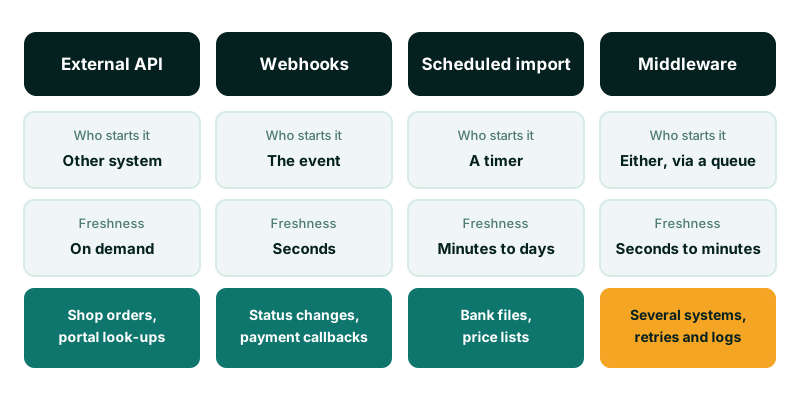
This table summarises the trade-offs we weigh at the start of an integration project.
| Option | Who starts it | Data freshness | Effort to support | Good fit |
|---|---|---|---|---|
| External API | The other system | On demand | Low to medium | Shop orders, portal look-ups |
| Webhooks | The system where the event happens | Seconds | Medium | Status changes, notifications |
| Scheduled import or export | A timer | Minutes to days | Low | Bank files, price lists, payroll inputs |
| Middleware | Either side, through a queue | Seconds to minutes | Higher | Several systems, strict reliability |
Mobile money is a common example in Kenya. A payment provider sends a callback when a payment completes, which is a webhook into your system. You may also query the provider’s API to confirm a transaction. The details change between providers and over time, so always work from the provider’s current documentation.
API users and security
Most integration security problems we see come from access, not from code. Get these right before launch day.
A dedicated user for each integration
Create one Odoo user per integration, named after the system it serves. Never reuse a person’s account. When that person leaves, the integration breaks, and every change it makes appears under their name.
Least privilege
Give the integration user only the access groups it needs. If it creates sales orders, it does not need Accounting manager rights. Test with that restricted user from the start, not with an administrator account that hides missing permissions until launch day.
API keys instead of passwords
Since Odoo 14, users can generate API keys from their preferences, under the Account Security tab. Use a key for each integration instead of the user’s password. Keys can be revoked individually, and they keep working if someone resets the password. Store them in a secrets manager or environment variable, never in source code or a shared spreadsheet.
Network and logging
Put the Odoo database behind HTTPS only. Where the other system has fixed addresses, restrict access to them at the firewall or proxy. Log every call the integration makes. Record enough to answer “what changed, when and from where”, but no personal data you do not need. Kenya’s Data Protection Act 2019 covers personal data moving between systems, not only data at rest. Check your obligations with your data protection adviser.
Common problems to plan for
- No owner. Every integration needs a named person who receives failure alerts and knows what to do.
- Matching on names. Customer and product names change. Store the other system’s ID on the Odoo record and match on that.
- Silent failures. A job that fails without telling anyone is worse than one that stops loudly. Alert on errors and on runs that did not happen.
- Upgrades. Field and method names change between Odoo versions. Keep a list of every model and field each integration uses, so you can check them before an upgrade.
- Testing on production. Point the integration at a staging copy first, with the same access rights it will have in production.
Where to start
List each system you want to connect. For each one, write down what data moves, in which direction, how fresh it must be and who owns it. That one page usually makes the choice between the API, webhooks, scheduled jobs and middleware obvious. Still deciding where Odoo will run? Read choosing Odoo Online, Odoo.sh or self-hosting first, because hosting affects which options are open.
Our Odoo ERP implementation service covers integration design, build and support. For a wider review of how your systems fit together, see our digital transformation service.