Odoo Online, Odoo.sh or self-hosted: how to choose
What each Odoo hosting option allows, how much effort it takes to run, and how to choose between them.
8 min read

Haulage orders, trucks, drivers and trips, from nomination to invoice.
The problem it solves
Fleet Management runs a haulage business inside Odoo: the orders customers place, the trucks and drivers nominated to carry them, each trip from loading to delivery, and the invoices, contractor bills and shortage charges that follow.
Because every truck and trip carries its own analytic account, the revenue a truck earns and the fuel, repairs and parts it consumes add up in one place, so you can see which trucks and routes pay.
Key features
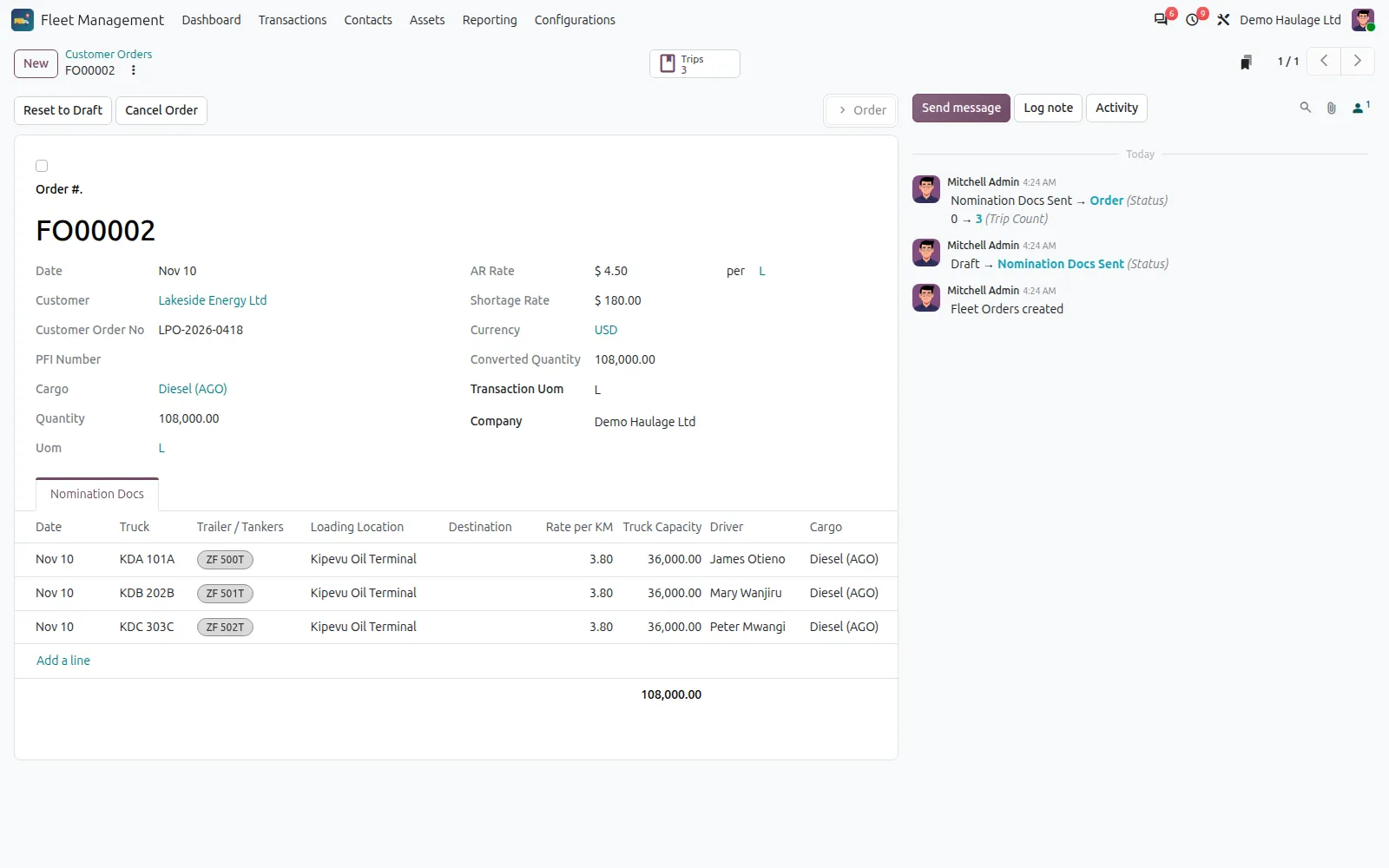
Each order holds the cargo, quantity, rate and route, and the trucks, trailers and drivers nominated for it. The nomination documents are emailed to the customer from the order.
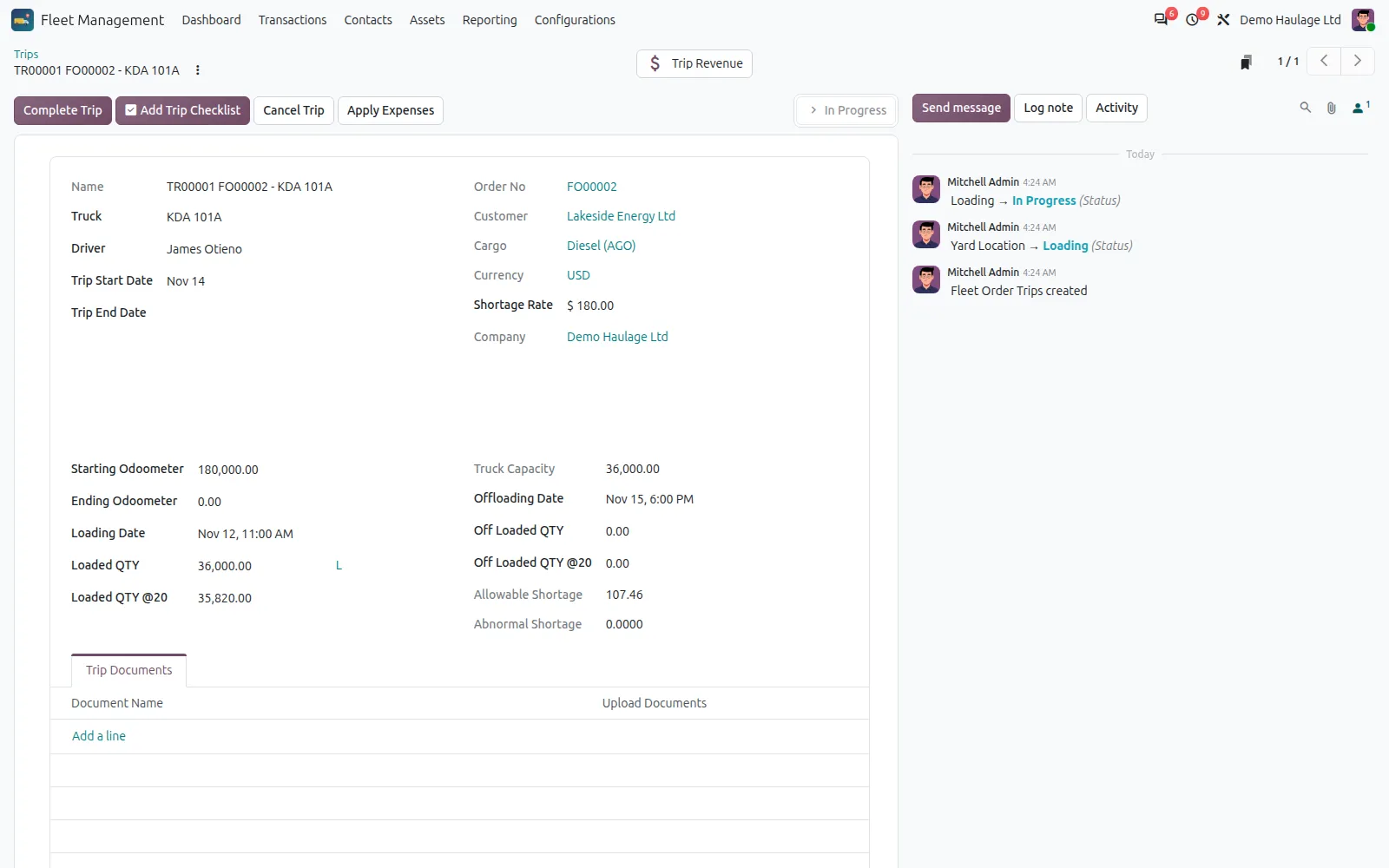
One click creates a trip for each nominated truck, with the mandatory trip documents and a seal line for each tanker compartment already in place.
Each trip moves from yard to loading, in progress, completed and invoiced, recording odometer readings and loaded and offloaded quantities, including at 20 °C.
On tanker trips, shortage above the cargo's allowed percentage is credited to the customer at the order's shortage rate and charged back to the driver or the contractor.
Trucks are company or contractor owned. Customer invoices and contractor bills are raised from completed trips, at a percentage or an amount per unit.
Each truck and trip gets its own analytic account, so revenue, truck expenses and workshop parts add up per truck.
How it works
Record the customer, cargo, quantity, rates and route, then nominate trucks and drivers.
Email the nomination documents to the customer, then create the trips.
Move the trip through loading and delivery, recording quantities, seals and documents.
Invoice the customer, bill contractor trucks and charge any shortage back.
What is included
| Feature area | What you get |
|---|---|
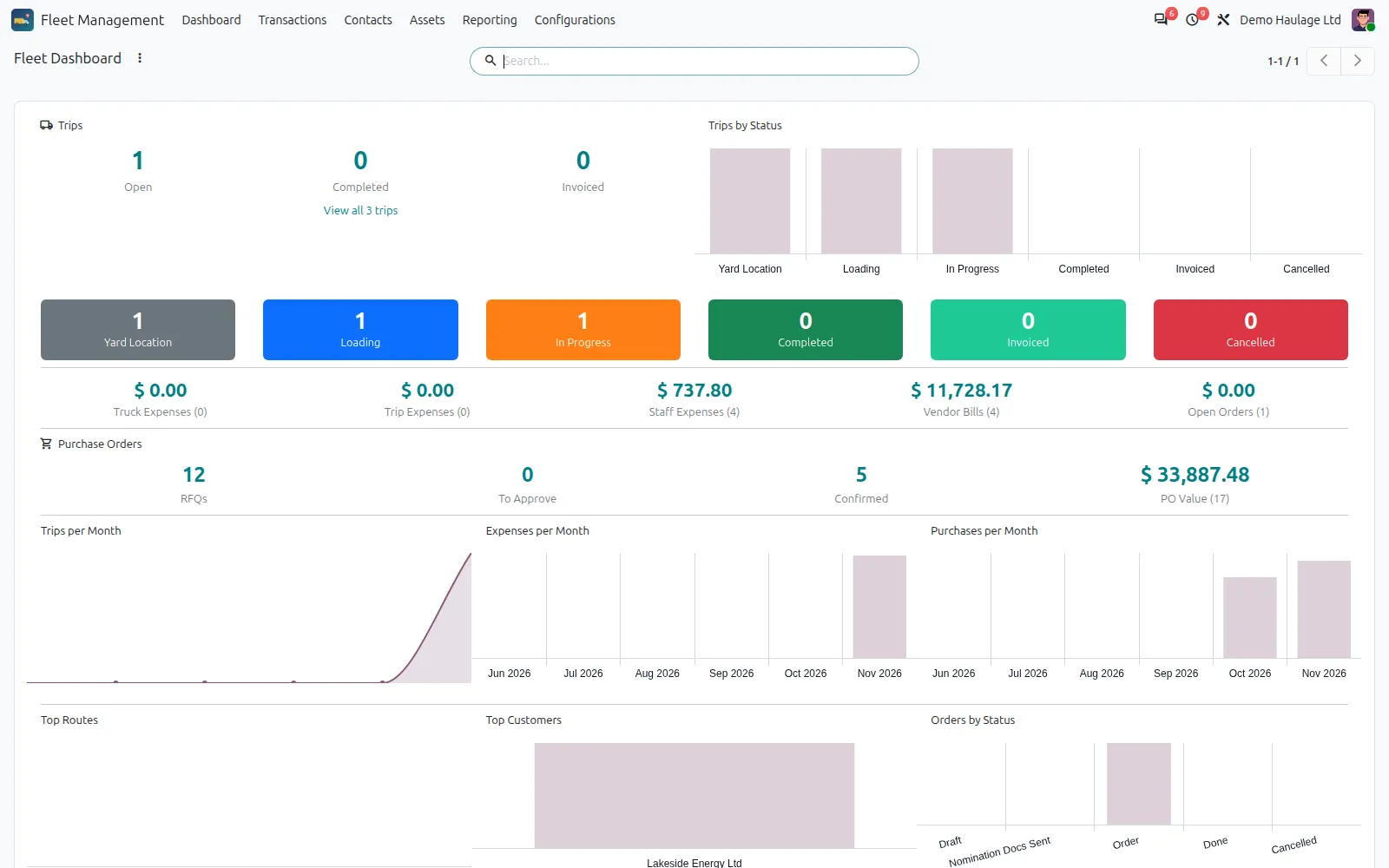
| Dashboard | Trips by stage, open orders, expenses, vendor bills and purchases, with monthly charts and top routes and customers. |
| Masters | Trucks with their trailers or tanks, drivers with licences and next of kin, routes with distances, and loading and offloading locations. |
| Documents | Driver, truck and trip documents with expiry dates, and document types that can be made mandatory on every trip. |
| Workshop | Workshop jobs per truck that issue spare parts from stock and record scrapped parts. |
| Truck expenses and charge sheets | Fuel, mileage, toll and repair expenses per truck, and charge sheets that record amounts to recover from a driver. |
| Reports | Trip and truck analysis and a contractor statement. |
Compatibility
Fleet Management is maintained for Odoo 15 to 20. Check the edition and the apps it needs before you plan an installation. If your set-up differs, ask us and we will tell you plainly what is possible.
Implementation and support
We install the add-on on your Odoo.sh project or server, after testing it on a copy of your database.
We set it up to match your rules, document numbering, accounts and user access.
Your users and administrators are trained on real examples, with a short written guide.
We fix issues, answer questions and keep the add-on running day to day.
When you move to a newer Odoo version, we upgrade the add-on and your data with it, tested on a copy first.
We maintain the add-on code, and any custom add-ons you already run, so they stay compatible as Odoo changes.
Questions
No. It is a separate app built for haulage and transport companies. It does not need the Odoo Fleet app and works from its own trucks, drivers, orders and trips.
Yes. It uses Inventory, Purchase, Expenses and Invoicing, which are all in Community.
Each cargo has an allowed shortage percentage. When a tanker trip is completed, any shortage above it is worked out from the loaded and offloaded quantities at 20 °C. At invoicing, the customer is credited at the order's shortage rate, and the amount is charged to the driver for company trucks or to the contractor for contractor trucks.
Yes. Each truck is marked company or contractor owned. Contractor trips are billed at the agreed rate, as a percentage or an amount per unit, and appear on the contractor statement.
Related articles
What each Odoo hosting option allows, how much effort it takes to run, and how to choose between them.
8 min read

When should several companies share one Odoo database, and when should they be kept apart? How to decide, and what each choice costs later.
7 min read
Related add-ons
Run properties, tenancies, landlords and maintenance inside Odoo.
For money going out. Every payment is approved by the right people before finance pays it, with a full record.
Need help beyond this add-on? See our Odoo ERP implementation service.
Book a demo and we will show you Fleet Management using examples from your own business.