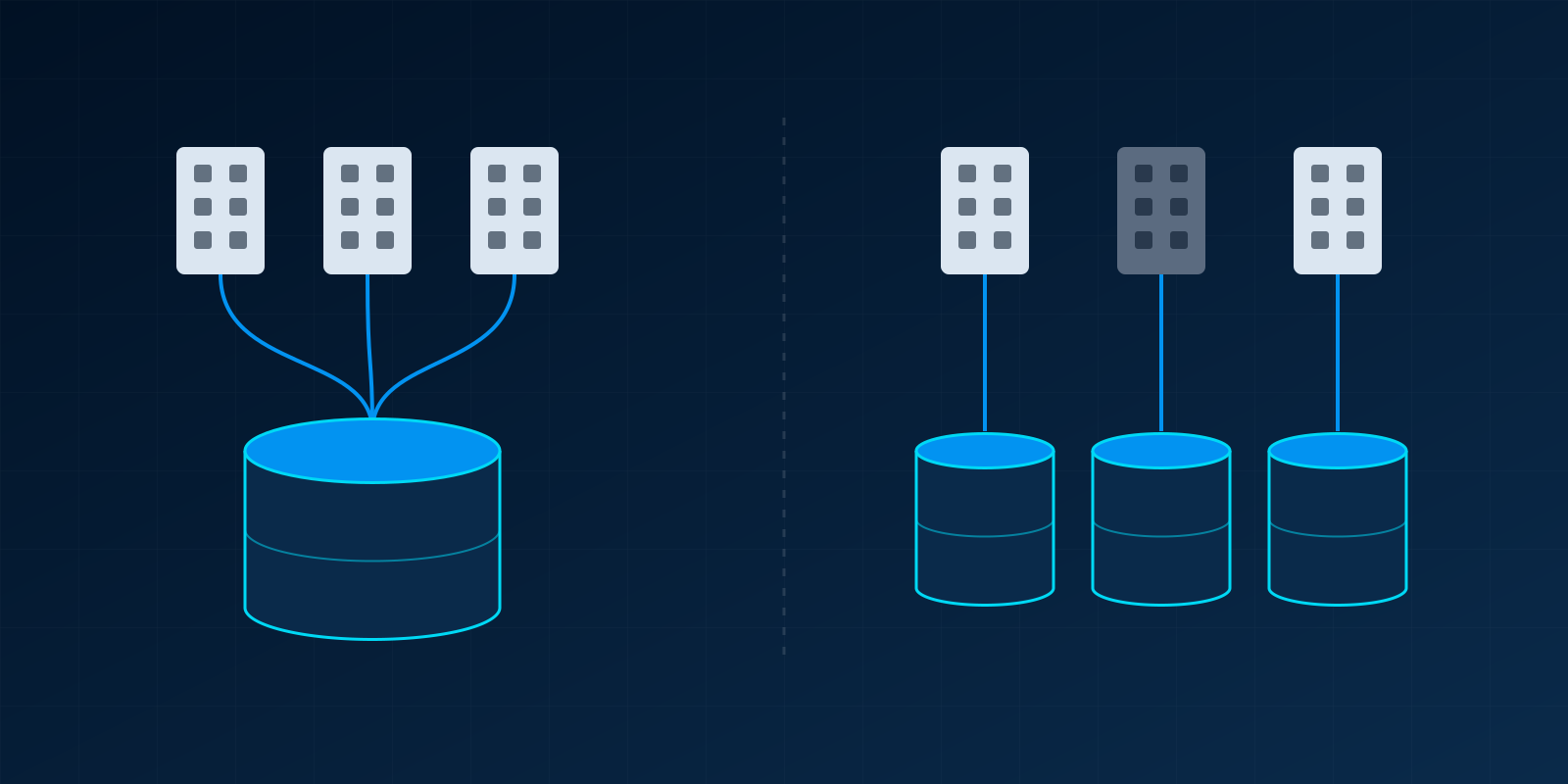
If your companies share customers, products, staff or stock, and you want one consolidated view, put them in one Odoo database with multi-company enabled. If they are run by different owners, on different Odoo versions, under rules that forbid shared data, or are likely to be sold separately, give each its own database. Most groups we work with fit the first case. The second case is less common, but choosing wrongly is expensive, because moving companies between databases later is a migration project in its own right.
This post explains how Odoo multi-company works in practice, what is shared by default, where the edges are, and the questions we ask before recommending one structure or the other.
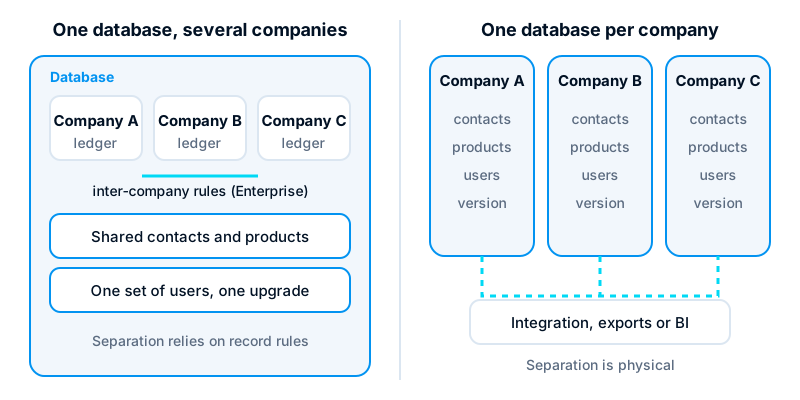
How multi-company works inside one database
Every Odoo database can hold more than one company. Each company has its own chart of accounts, journals, taxes, fiscal positions, bank accounts and fiscal localisation. Users are given access to one or more companies and switch between them from the company selector in the top bar.
Since Odoo 13, a user can tick several allowed companies at once and see their records side by side, for example a single list of sales orders across three companies. Behind this, record rules filter data by the companies the user currently has selected. Many fields are also company-checked, so Odoo refuses to save a document that mixes records from different companies, such as an invoice in company A using a journal from company B. In older versions (11 and 12) the behaviour was looser: one active company at a time, and fewer consistency checks, which is one reason multi-company data in those databases often needs cleaning before an upgrade.
Odoo 17 added branches: a company can have child companies that share parts of its accounting setup while keeping their own records. For groups whose “companies” are really divisions or locations of one legal entity, branches can be a better fit than fully separate companies. If the entities are separate legal persons with their own tax registrations, they should normally be separate companies.
Multi-company itself is available in both Community and Enterprise. Check your subscription, though: on Odoo’s current pricing, multi-company use is tied to the higher plan rather than the entry plan, so confirm what your plan includes before you design around it.
What is shared and what is not
This is where most design decisions are made. The defaults are reasonable, but they need to be set deliberately at the start, because changing them after a year of transactions is painful.
Shared by default
- Contacts. A partner record with no company set is visible to every company. One customer record can then be invoiced by any company in the group, and its history is in one place.
- Products. Products with no company set are shared. Each company can still have its own cost, income and expense accounts and taxes on that product, because those properties are stored per company.
- Users. One login can work across several companies, which is far simpler than managing duplicate accounts.
Separate by design
- Accounting. Ledgers, journals and tax returns belong to one company. Each company closes its own periods and files its own returns.
- Warehouses and stock. Each warehouse belongs to one company. Moving goods between companies is a sale and a purchase, not an internal transfer.
- Sequences. Invoice and order numbering is per company, so each entity keeps its own unbroken series.
Restricting shared records
You can set a company on a contact or product to make it private to that company. Do this on purpose and for a reason, such as a supplier that must never be used by another entity. Mixing shared and restricted records without a rule is the commonest cause of “record not found” errors and of users creating duplicates because they cannot see the original.
Inter-company transactions
When companies in one database trade with each other, someone has to raise a sales invoice in one company and a matching vendor bill in the other. Odoo Enterprise includes inter-company rules that do this automatically: confirm a sales order in company A to company B, and Odoo can create the purchase order in B, or generate the bill when the invoice is posted. The exact options vary by version, so test them against your own flow.
These rules are Enterprise only. On Community, the same result needs either disciplined manual entry, a custom module, or a reviewed community add-on. That is not a reason to avoid multi-company on Community, but it should be costed into the decision.
Inter-company stock, loans and recharges of shared costs also need agreed accounts and a monthly reconciliation routine. Odoo will post what you tell it to. It will not decide your group’s transfer pricing policy.
When separate databases are the better choice
Separate databases give physical isolation. Nothing is shared unless you build a link. That is the right answer in a smaller set of cases:
- Different ownership or governance. If the companies have different shareholders, or one is likely to be sold, a separate database makes the exit clean. Splitting one database later means exporting and re-importing data and history.
- Strict data separation. Some regulated activities, or contractual duties to clients, require that staff in one entity cannot see the other’s data even by mistake. Record rules are dependable, but they are configuration. Some auditors and boards prefer separation that does not depend on configuration at all.
- Different versions or hosting. One database runs one Odoo version with one set of modules. If one entity needs a heavy customisation the others do not want, or needs to upgrade on a different timetable, separate databases avoid holding everyone back.
- Different countries with no shared operations. Several localisations can coexist in one database, but if the companies share nothing operationally, the main benefit of one database is gone.
The cost is real. Each database has its own users, upgrades, backups and module maintenance. Consolidated reporting needs exports, a data warehouse or a BI tool. Inter-company trades have to be keyed twice or synchronised through the API. Where you host also matters here: our comparison of Odoo Online, Odoo.sh and self-hosting covers how each option handles several databases.
Questions we ask before recommending a structure
We ask these in the first workshop, before any configuration:
- Who owns each company, and is that likely to change? A planned sale or a joint venture points towards separation.
- Do the companies share customers, suppliers or products? If yes, one database avoids duplicate master data and conflicting prices.
- Do staff work across companies? Shared finance or procurement teams benefit most from one database.
- How much do the companies trade with each other? Frequent inter-company sales favour one database, with Enterprise if you want the rules automated.
- Is any data legally or contractually ring-fenced? If yes, ask whether record rules satisfy the requirement, and get that answer in writing from whoever owns compliance.
- Do you need consolidated reports, and how often? Monthly group reporting is much easier when the figures already sit in one database, as Odoo’s financial reports can be run across the companies a user has selected.
- Are all companies ready to move at the same time? One database means one launch plan and one upgrade path. If one entity cannot be ready, plan a phased rollout into the same database rather than a separate one by default.
Practical advice for a one-database setup
If you choose one database, a few habits keep it healthy:
- Decide the master data policy first. Write down which contacts and products are shared and which are restricted, and who may create them.
- Name companies clearly. Use the legal name on documents, but give users a short label they recognise in the company selector.
- Test record rules with real users. Log in as a user from each company and try to open another company’s invoices, stock and employees. Do this again after every upgrade.
- Review custom modules for company awareness. Custom models that do not carry a company field, or ignore the selected companies, are the usual source of data leaking between entities. Any module we write for a multi-company database carries a company field and the matching record rule from the start.
- Keep one upgrade plan. Every company moves version together, so involve each entity’s finance lead in upgrade testing.
Getting the structure right first
The structure of an Odoo database is the hardest thing to change after launch. A few hours spent answering the questions above saves weeks of migration later. If you are planning a group rollout, or have inherited a multi-company database that is not behaving, our Odoo ERP service covers design, configuration and upgrades. Where the question is wider than Odoo, such as which entities should share which systems at all, our digital transformation consultancy starts with that map.