
If you think a server has been compromised, do four things in the first hour, in this order. Isolate it from the network without switching it off. Preserve evidence: snapshot the disks and copy the logs somewhere the attacker cannot reach. Work out how far the intrusion goes and how the attacker could get back in. Then rotate credentials from a clean machine and start the clock on any legal duty to notify. Do not wipe, patch or reboot until the evidence is safe. Rebuilding and restoring come after the first hour, not during it.
This post is written for the person who gets the call: an IT lead, a developer who looks after the servers, or a manager who needs to know what should be happening.
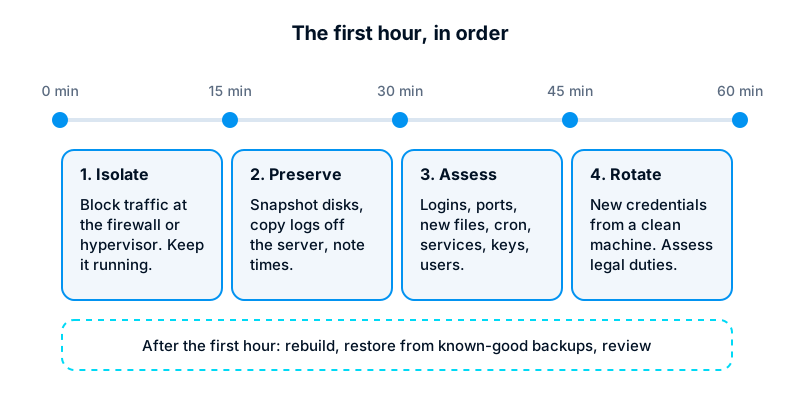
Minutes 0 to 15: isolate, do not power off
The instinct is to pull the plug. Resist it. Powering off destroys everything held in memory: running processes, open network connections, decrypted data and malware that never touched the disk. It can also trigger clean-up scripts that an attacker left behind.
Isolate instead:
- Cloud servers: replace the server’s security group or firewall rules with one that blocks all traffic except SSH from a single known address, the one you will work from. Most providers let you do this from the console without touching the server itself.
- Virtual machines on your own hosts: disconnect the virtual network adapter at the hypervisor, or move the machine to an isolated network.
- Physical servers: unplug the network cable, or shut the switch port, rather than the power.
If the server is actively destroying data, for example ransomware encrypting files as you watch, stopping it may be worth the evidence lost. That is a judgement call. Make it deliberately, and write down the time and the reason.
Start an incident log now. A plain text file or a shared document is enough. Record every action, who did it and when, in UTC or with a stated time zone. You will need this for the review, for insurers and possibly for regulators.
Minutes 15 to 30: preserve evidence
Evidence is the only way to answer the questions that matter later: how they got in, what they touched and whether personal data left the building.
- Snapshot the disks. On most cloud platforms this is a console action that does not need a login to the server. Label the snapshot with the date and incident reference, and restrict who can delete it.
- Capture memory if you can. Memory acquisition needs tools and practice. If nobody on hand has done it before, do not improvise on the live system; the snapshot and logs are more important.
- Copy logs off the server. Authentication logs, web server access and error logs, application logs and the systemd journal. Attackers often clear logs once they notice they have been seen.
- Pull logs from outside the server too. Firewall and load balancer logs, cloud audit logs, DNS logs and Microsoft 365 sign-in logs if any accounts are shared.
Work read-only wherever possible. Copy files out; do not edit, move or “tidy” them on the compromised machine.
Minutes 30 to 45: assess scope and persistence
Now look, carefully. The commands below only read information. Run them from your isolated session, save the output to files and copy those files off the server with the logs.
# Who has logged in, and from where (successful and failed)
last -Faiwx | head -50
lastb -Faiw | head -50          # needs root; failed logins

# What is listening and what is connected
ss -tulpn
ss -tanp state established

# Running processes as a tree, with full command lines
ps auxfww

# Files changed in the last two days, on the root filesystem only
find / -xdev -type f -mtime -2 -printf '%TY-%Tm-%Td %TH:%TM %p\n' 2>/dev/null | sort
Then check the places attackers use to come back after you think they have gone:
# Scheduled tasks for every user, plus system cron and timers
for u in $(cut -d: -f1 /etc/passwd); do crontab -l -u "$u" 2>/dev/null | sed "s/^/$u: /"; done
ls -la /etc/cron.* /var/spool/cron 2>/dev/null
systemctl list-timers --all

# Services and unit files added or changed recently
systemctl list-unit-files --state=enabled
find /etc/systemd /lib/systemd /usr/lib/systemd -mtime -7 -type f 2>/dev/null

# SSH keys and accounts
find / -xdev -name authorized_keys -exec ls -la {} \; -exec cat {} \; 2>/dev/null
awk -F: '$3 == 0 || $3 >= 1000' /etc/passwd
grep -E 'sudo|wheel' /etc/group

# Possible web shells: recently changed scripts under the web root
find /var/www -type f \( -name '*.php' -o -name '*.py' -o -name '*.jsp' \) -mtime -7 2>/dev/null
Adjust paths to your setup. An Odoo server, for instance, also needs its custom addons directory and the Odoo configuration file checked, and the database users reviewed.
Do not run anything destructive at this stage. No rm, no kill on suspicious processes, no package upgrades, no reboots and no “clean-up” scripts found online. Every one of these changes the evidence, and some malware reacts to being probed. If you find something alarming, record it and keep going. Removal comes during the rebuild.
What you are looking for: logins from unfamiliar addresses or at odd hours, listening ports you did not open, processes running from /tmp or /dev/shm, new accounts or UID 0 accounts other than root, SSH keys nobody recognises, cron entries that download and run scripts, and recently changed files under the web root.
Also ask whether the attacker could have moved sideways. Did this server hold SSH keys, database passwords or API tokens for other systems? If so, those systems are in scope too.
Minutes 45 to 60: credentials and the duty to notify
Rotate credentials from a clean machine
Assume every secret on the compromised server, and every password typed into it, is known to the attacker. Rotate them, but do it from a machine you trust: not the compromised server, and not a laptop that has logged into it with forwarded agents or stored keys.
Prioritise in this order: cloud and hosting control panel accounts, domain registrar and DNS, administrator accounts and SSH keys, database passwords, API keys for payment providers, email and other services, then ordinary user passwords. Turn on multi-factor authentication anywhere it is missing.
Work out whether you must notify
If personal data may have been accessed, you probably have legal duties, and the clock may already be running. In Kenya, the Data Protection Act 2019 requires a data controller to notify the Office of the Data Protection Commissioner within 72 hours of becoming aware of a breach affecting personal data, where there is a real risk of harm to the people concerned. In some cases the affected individuals must be told as well. A data processor must notify the controller without delay. Other countries have similar duties with different thresholds and deadlines, and contracts with clients may add their own.
Speak to your legal counsel or data protection officer early, within this first hour if you can. Do not wait for the investigation to finish before deciding: the duty is triggered by awareness, not certainty, and notifications can be updated as more is known. Tell your insurer if you have cyber cover, because many policies have their own notification terms.
After the first hour: rebuild, restore, review
Once the evidence is safe and the immediate risk is contained:
- Rebuild, do not clean. A compromised server cannot be trusted again, however thorough the clean-up. Build a fresh server from a known image, harden it, and deploy your application from source control.
- Restore data from known-good backups. Pick a backup taken before the earliest sign of intrusion, not simply the latest. Check it in isolation before you connect it to anything. This is where regular restore tests prove their worth.
- Close the way in. Whatever the entry point was, an unpatched service, a reused password, an exposed admin panel, fix it on the new server before it goes live.
- Watch closely. Monitor the rebuilt server and the rotated accounts for some weeks. Attackers who lose access often try again.
- Hold a post-incident review. Within a couple of weeks, go through the incident log: what happened, what worked, what was slow, what changes now. Keep it blameless and factual, and turn each finding into an owned task with a date.
Prepare before you need it
Everything above is easier with preparation: a written runbook, a contact list including legal counsel, centralised logs, tested backups and a hosting account where you can snapshot and firewall a server in minutes. The worst time to find out who holds the cloud console password is during an incident.
Our managed IT service covers server hardening, monitoring, tested backups and incident response, and we can help you prepare a runbook for your own systems before anything goes wrong.