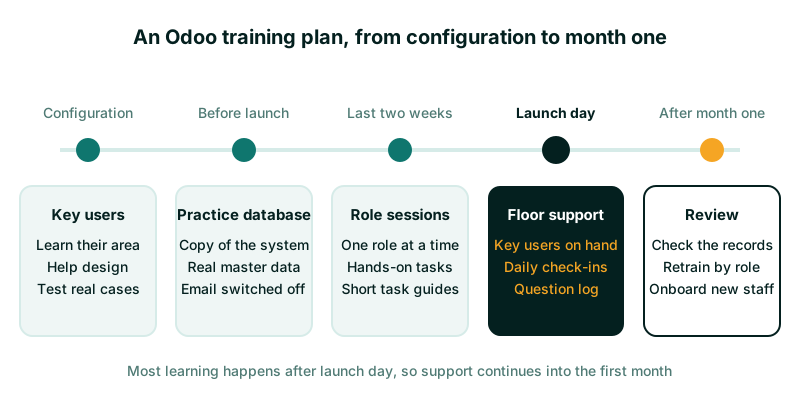
A good Odoo staff training plan trains a few key users first. Then everyone practises their own daily tasks in a copy of the system before launch day. Train by role, not by app: a stores clerk needs receipts and transfers, not a tour of Inventory. Give each role a short written guide of their top tasks. Then keep key users on the floor for the first weeks, because most real learning happens once people use Odoo for actual work.
This post sets out how we plan training on Odoo projects, and what we have learned about where it goes wrong.
Why training fails on Odoo projects
Training usually fails for one of three reasons, and none of them is about the software.
- It happens too early. People attend a demonstration two months before launch, then forget it. Training that is not used within a week or two fades fast.
- It is generic. A trainer clicks through every menu of Sales or Accounting. Staff see screens they will never use and miss the three they need every day.
- It stops on launch day. The first real invoice, the first stock count and the first month-end raise questions no session covered. If nobody is there to answer, people return to their spreadsheets.
A plan that fixes these three problems is more valuable than any amount of extra classroom time.
Choose key users first
A key user is a member of your staff who learns one area of Odoo deeply and becomes the first point of help for colleagues. Choose one per department or process: finance, sales, purchasing, stores, HR, and so on.
Good key users share a few traits:
- They do the work themselves, or supervised it recently.
- Colleagues already ask them how things are done.
- They can spare time during the project. Plan on a meaningful part of their week, not an hour here and there.
- They are patient with questions they have heard ten times.
Involve key users while the system is being configured, not after. When they help decide how a process works in Odoo, they understand why it works that way. They can then explain it to colleagues in their own words, which is far more convincing than a consultant saying it.
Key users also become your testers. They know the awkward cases: the customer who always pays in two parts, the supplier who sends one bill for three deliveries. Those cases belong in testing, and later in training.
Train by role, not by app
Odoo is organised by app: Sales, Purchase, Inventory, Accounting. Your staff are not. A sales administrator may touch Sales, Inventory and Invoicing in one task, and never open Purchase.
Start by listing the roles in your organisation and the tasks each one does in a normal week. Then map each task to the Odoo screens involved.
| Role | Typical weekly tasks | Odoo apps involved |
|---|---|---|
| Sales administrator | Quotations, order confirmation, delivery follow-up | Sales, Inventory |
| Stores clerk | Receipts, internal transfers, delivery validation, counts | Inventory |
| Accounts assistant | Vendor bills, customer invoices, payment registration | Accounting or Invoicing |
| Finance manager | Approvals, bank reconciliation, period close, reports | Accounting |
| Department head | Approving requests, checking budgets and reports | Several, read-mostly |
Each session then covers one role’s tasks, in the order they happen, using your own products, customers and documents. A stores clerk receiving goods against a real purchase order learns far more than one watching a demo company.
Keep sessions short. Ninety minutes of hands-on work is plenty for most roles. Run a second session a few days later for questions and the less common tasks.
Give people a practice database
Staff need somewhere to make mistakes safely. A practice database, sometimes called a sandbox or training database, is a copy of your configured system where nothing counts.
How you create it depends on hosting:
- Odoo Online: you can duplicate a database from your database manager on odoo.com. Use the copy for practice, and tell users clearly which address is which.
- Odoo.sh: staging branches are built from a copy of production, with outgoing email disabled. They are well suited to training.
- Self-hosted: restore a backup to a separate database. Disable outgoing email, scheduled actions and any live integrations first. Recent Odoo versions include a neutralise option that does much of this, but check what it covers on your version.
Whatever the method, make the practice database look different. Change the company name to include “TRAINING”, or use a different colour theme if your version allows it. Staff who confuse the two will either post real work into the copy or test in the live system.
Load realistic data. A practice database with three dummy products teaches very little. Use a recent copy of your real master data: customers, suppliers, products and opening stock, once they have been imported for testing.
Give people exercises, not free time. “Receive the goods on PO00123, two cartons are damaged” is better than “have a look around”.
Write short guides for each role
Long manuals are not read. What people use is a short guide for each task, kept where they work.
A good task guide:
- Has a title that names the task: “Register a supplier payment”.
- Lists when you do it and what you need before you start.
- Gives five to ten numbered steps, with one screenshot where a screen is confusing.
- Says what to check when you finish, and who to ask if it goes wrong.
Aim for one page per task. Group the pages by role, so each person gets a pack of perhaps ten guides rather than a book. Update them when the configuration changes, or they will mislead people.
Odoo can host these guides itself. The eLearning app, available in Community and Enterprise, can hold courses with videos and quizzes. The Knowledge app is Enterprise only. A shared folder of PDFs works too. What matters is that the guides are easy to find and kept current.
Odoo’s own tutorials on odoo.com are a useful supplement for general navigation. They show the standard system, though, not your configuration, so they do not replace your own guides.
Plan the first weeks after launch day
The weeks after launch are the most important training period. People now meet real situations, and they need fast answers.
Floor support
On launch day and for the first week, have key users and your implementation partner available in person or on a quick call. Do not ask staff to raise a ticket for “how do I” questions in week one. They will stop asking and find a workaround instead.
A simple question log
Keep a shared list of every question and problem raised. For each, record who asked, what happened and the answer. After a week, patterns appear. If five people ask how to handle a partial delivery, that needs a guide or a short refresher session, not five separate answers.
Daily check-ins
A fifteen-minute check-in each morning for the first week or two keeps small problems small. Key users report what they saw, the partner explains fixes, and everyone hears the same answer.
The first month-end
Finance teams meet a whole new set of tasks at the first period close. Schedule a working session before it, using that month’s real data. Walk through bank reconciliation, accruals, reports and lock dates together, in the order they will happen.
If approvals are part of the new system, train approvers separately. They are often senior staff who use Odoo for a few minutes a day. Show them where requests wait, how to approve on a phone, and what the audit trail records. Our post on payment approval workflows explains what that trail should contain.
Measure whether training worked
You cannot measure training by attendance. Measure what happens in the system.
- Are people using Odoo for the work? Look for work still done outside it, such as quotations in Word or stock movements on paper.
- Are records correct? Check a sample of transactions each week for wrong accounts, missing references or skipped steps.
- Are the questions changing? In week one, questions are about basic steps. By week four they should be about exceptions. If they are still basic, retrain that role.
Repeat short sessions for anyone who joined late, changed role or is clearly struggling. Add new staff to the same role packs, with their key user as the first trainer.
Where to start
Name your key users this week and give them time on the project. Then list your roles and their weekly tasks, because that list drives everything else in the plan.
Our Odoo ERP implementation service includes key-user training, a practice database and role guides as part of the project. If the change is wider than one system, our digital transformation service helps plan how teams adopt new ways of working.