A small business is ready for ransomware when three things are true. Attackers find it hard to get in, because every account has two-step sign-in (MFA), systems are patched and staff have only the access they need. An attack cannot spread far, because the network is split and backups sit out of reach. And you can recover without paying. You hold offline or immutable backups, you have tested a restore, and a written plan says who does what and who to call. This checklist covers all three. None of it needs a large budget, but all of it needs an owner.
The list is written for owners and managers of small businesses, and for the person who looks after their IT, in-house or outsourced.
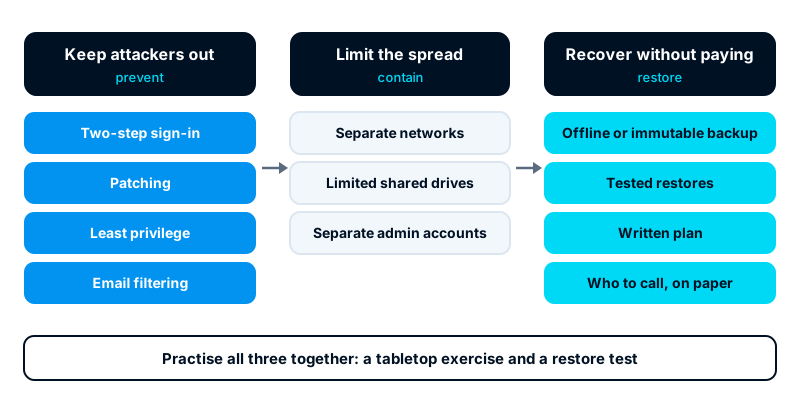
Keep attackers out
Ransomware usually arrives through a stolen password, an unpatched system exposed to the internet or a malicious email attachment or link. Close those doors first.
- Two-step sign-in on every account that supports it. Email, remote access, VPN, cloud storage, accounting, hosting and domain registrar accounts come first. Prefer an authenticator app, passkey or security key to text-message codes.
- No remote desktop open to the internet. If staff need remote access, put it behind a VPN or a remote access gateway with MFA.
- Patch quickly. Turn on automatic updates for operating systems and browsers. Patch internet-facing systems, such as firewalls, VPN appliances, email servers and websites, as soon as security fixes are released.
- Retire unsupported systems. A computer or server that no longer receives security updates should be replaced or cut off from the network.
- Least privilege. Staff work on ordinary accounts. Administrator rights are kept for separate admin accounts used only for admin work. Remove access the day someone leaves.
- Email filtering. Use the filtering your email provider offers, block risky attachment types and mark external emails clearly.
- Staff awareness. Teach staff to report a suspicious email or an unexpected sign-in prompt. Make reporting quick and never punish someone for clicking.
- Endpoint protection. Run up-to-date protection on every computer and server, with alerts sent to someone who will act on them.
Make backups ransomware cannot reach
Modern ransomware looks for backups and destroys them before it encrypts anything else. A backup on a drive that is always plugged in, or in a folder the same account can delete, will not survive.
- Keep at least one copy offline or immutable. Offline means disconnected: a drive that is unplugged and stored away. Immutable means the storage refuses changes or deletion for a set period, even by an administrator. Many cloud backup services offer this.
- Use separate credentials. The backup system’s admin account must not be the same as your everyday or domain admin account. Protect it with MFA.
- Back up what you would need to run the business. That means the accounting or ERP database, shared files and system configuration. Include email if a cloud provider does not already hold it.
- Know how far back you can go. Attackers may sit in a network for some time before they strike. Keep enough history to restore from before the intrusion.
- Test a restore regularly. Restore a file, a database and, at least once a year, a whole server. Time it. That is your real recovery time.
If you run Odoo, where it is hosted decides who holds the backups. Our comparison of Odoo Online, Odoo.sh and self-hosting explains what each option includes. Whatever the option, keep a copy of the database you control.
Limit how far an attack spreads
If ransomware gets onto one laptop, segmentation decides whether you lose one laptop or the whole office.
- Split the network. Keep guest Wi-Fi, staff devices, servers, printers and cameras on separate networks. Most business-grade routers and firewalls support this.
- Limit shared drives. Each person can write only to the folders they need. A user who can write to every share lets ransomware encrypt every share.
- Separate admin work. Admin accounts should not be used to read email or browse the web.
- Turn off what you do not use. Old file shares, unused remote access tools and forgotten test servers are easy ways in and across.
- Keep an asset list. You cannot protect, or later check, devices nobody knows about. List computers, servers, network devices and cloud services, with their owner.
Write an incident plan
A plan does not need to be long. Two or three pages that people have read beat a thick binder nobody can find. Print a copy, because the shared drive may be encrypted when you need it.
Your plan should answer:
- Who decides. Name the person who leads the response, and a deputy.
- How to raise the alarm. Staff should know to disconnect a suspect computer from the network, leave it switched on and call a named person.
- First actions. Isolate affected systems, protect the backups, preserve evidence and start an incident log. Our post on the first hour after a server compromise sets out the order for servers.
- How you will keep working. Which processes can run on paper or elsewhere for a few days? Think of taking orders, paying staff and answering customers.
- What gets restored first. Agree the order in advance, starting with the systems the business cannot run without.
- How you will communicate. Who tells staff, clients, customers and suppliers, and through which channel if email is down.
- The decision on payment. Agree now who would decide, and on what advice. Paying does not guarantee your data back, and payments to some groups may be unlawful. Take legal advice and speak to your insurer before any decision.
Know who to call
Keep this list in the plan, on paper and on a phone, with names and numbers:
- Your IT provider or in-house lead, with an out-of-hours number.
- Your cyber insurer, if you have cover. Many policies require prompt notice and may provide a response team.
- Legal counsel or your data protection officer. If personal data may be affected, legal notice duties may apply. In Kenya, the Data Protection Act 2019 sets a 72-hour window to notify the Office of the Data Protection Commissioner of a qualifying breach. Confirm current requirements with your adviser.
- The national incident response team. In Kenya, that is the National KE-CIRT/CC. Other countries have their own national teams.
- The police, if you want to report the crime.
- Key suppliers and hosting providers, including the account numbers you will need to prove who you are.
Practise
A plan nobody has tried will fail in small, avoidable ways. Run a short tabletop exercise once or twice a year:
- Gather the people named in the plan for an hour.
- Read out a scenario: “On Monday morning the accounts team finds every shared file renamed and a ransom note on screen.”
- Walk through the plan step by step. Who is called first? Where is the printed contact list? Which backup would you restore, and how long would it take?
- Write down every gap, give each one an owner and a date, and update the plan.
Pair the exercise with a real restore test, so you know the backups and the plan both work.
Where to start
Start with the three items that close most doors. Put MFA on every account, keep one backup copy that ransomware cannot reach, and write a one-page plan with names and numbers. Then work down the rest of this list over the next few months.
Our managed IT service covers patching, MFA roll-out, backups with restore testing, network segmentation and incident response. We can also run your first tabletop exercise with you.