A good Odoo payment approval workflow routes every request by amount and risk to a defined chain of approvers, stops anyone from approving their own request or paying what they approved, notifies each approver when it is their turn, and records every decision. Standard Odoo gives you parts of this: purchase order approval, the Enterprise Approvals app and access rights. For anything beyond a single threshold you need to design the rules first and then decide whether configuration is enough or a dedicated module is justified.
This post covers the design, because that is where most approval projects succeed or fail.
Start with the policy, not the software
Before opening Odoo, write down the approval policy as your finance team actually runs it. In our experience the written policy and the real practice often differ, and the system will enforce whichever one you give it.
Answer these questions on paper:
- What needs approval? Supplier payments only, or also staff advances, petty cash top-ups, refunds and inter-company transfers?
- What sets the route? Usually amount, but often also the department, cost centre, project, supplier type or budget line.
- Who approves at each level? Name roles, not people: “finance manager”, not a named individual.
- Sequential or parallel? Must the line manager approve before finance sees the request, or can several approvers act at the same time?
- What happens on rejection? Back to the requester for correction, or closed for good?
- Who can override, and how is that recorded?
- Who pays? The person who releases payment must not be the person who requested or approved it.
If the answers fit on one page, the workflow will be easy to configure and easy to audit.
Amount bands and risk categories
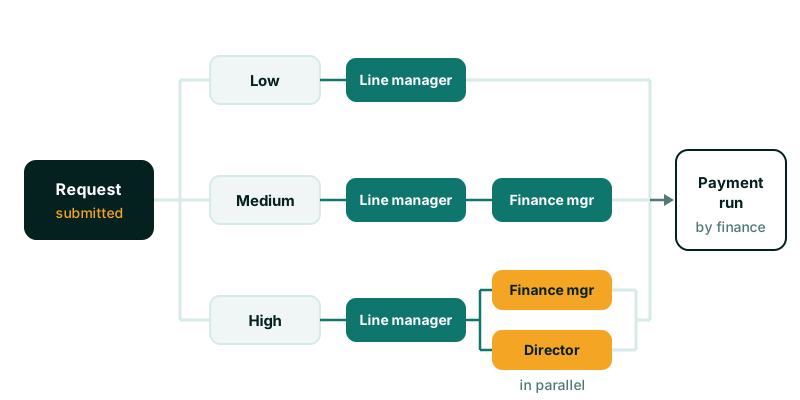
Most organisations end up with three or four bands. A typical design looks like this. The amounts are placeholders: set them from your own policy and currency.
| Band | Example range | Approval chain | Mode |
|---|---|---|---|
| Low | Up to a small limit | Line manager | Single approver |
| Medium | Up to a mid limit | Line manager, then finance manager | Sequential |
| High | Above the mid limit | Line manager, then finance manager and a director | Sequential, then parallel |
| Special | Any amount, flagged type | Finance manager and compliance | Parallel |
The “special” band matters. Some payments are risky because of what they are, not how large they are: a first payment to a new supplier, a change of supplier bank details, a payment to a related party. Route those by category, regardless of amount.
Sequential or parallel
Sequential approval suits cases where each approver checks something different and the order matters. The line manager confirms the work was done; finance confirms the budget and the coding. There is little point in finance reviewing a request the manager will reject.
Parallel approval suits cases where approvers are independent checks of equal weight, such as a finance manager and a director on a large payment. It is faster, because neither waits for the other. Decide whether all parallel approvers must approve, or a minimum number of them.
What standard Odoo provides
Know what is already there before deciding to build anything.
Purchase order approval
In the Purchase app settings you can require a second approval for purchase orders above a set amount. Orders over the limit wait for a user with Purchase administrator rights. This is available in Community and Enterprise. It is a single threshold with one approver group, and it applies to purchase orders, not to payments or bills raised without an order.
The Approvals app (Enterprise)
The Approvals app lets you define approval categories, assign approvers, set a minimum number of approvals, and, in recent versions such as Odoo 17 and 18, require approvers to act in sequence. It works well for general requests such as purchase requests, leave of absence or travel. Its limits for payments are that routing by amount bands is not built in, so you would create a category per band and rely on people choosing the right one, and the approved request is not tied to the accounting entry that pays it. The Approvals app is Enterprise-only, which also rules it out on Community.
Access rights
Accounting access groups separate who can create bills, who can post them and who can register payments. Use them. A common weakness in Odoo databases we review is that most finance users have the full accountant role, which makes segregation of duties impossible to show to an auditor.
Segregation of duties
Segregation of duties means no single person can create, approve and pay the same transaction. In Odoo terms, enforce it at three points:
- Submission: the requester cannot be an approver on their own request, even if they hold the approver role for others.
- Approval: an approver cannot approve the same request twice at different levels.
- Payment: the user who registers or confirms the payment is not the requester or any approver of it.
Enforce these rules in the system, not by instruction. A rule that relies on people remembering will be broken at month end when everyone is busy. Where a small team genuinely cannot separate duties, record an override with a reason and a second person’s sign-off, and report on overrides each month.
Notifications and follow-up
Approvals stall when approvers do not know something is waiting. Odoo’s activity system is the right tool: each approver receives an activity on the request with a due date, and it appears in their activity list and notifications.
Practical points from delivery:
- Create the activity only for the approver whose turn it is. In a sequential chain, notifying everyone at once trains people to ignore the notifications.
- Set due dates per band. A low-value request can wait a day; an urgent supplier payment cannot.
- Remove outstanding activities when a request is rejected or cancelled, so nobody approves something that is already dead.
- Give finance a list view of requests waiting longer than the due date, grouped by approver.
The audit trail
An auditor will ask four questions about any payment: who asked for it, who approved it, when, and what changed in between. Your design should answer all four from the record itself.
Record on each request:
- Submission, with the user, date and the amount at submission.
- Each approval and rejection, with the user, the level, the date and any comment.
- Every change to amount, supplier, bank account or analytic coding after submission.
- The link to the resulting payment or journal entry.
Odoo’s chatter and field tracking cover much of this if you switch tracking on for the right fields. The important design rule is that a change to amount or payee after approval must reset the approvals. Otherwise a request approved at a low amount can be paid at a higher one.
Configuration or a module?
Configure standard Odoo when you have one threshold, few approvers and approvals that sit on purchase orders. Consider a dedicated module when you need:
- Several amount bands, each with its own approvers.
- Mixed sequential and parallel chains.
- Segregation of duties enforced by the system.
- Approvals for payments that do not come from purchase orders, such as advances and petty cash.
- An audit trail that links each approval to the accounting entry.
Whichever route you take, keep it compatible with standard Accounting so upgrades remain simple. A custom module means Odoo.sh or self-hosting, not Odoo Online. Our post on choosing Odoo Online, Odoo.sh or self-hosting explains that trade-off.
Testing before launch
Write test cases from the policy table, one per band and one per rule. For each, check who receives the activity, who can approve, who is blocked and what the audit trail shows. Include the awkward cases: a requester who is also a finance manager, a request edited after first approval, an approver on leave. Run them on a copy of production data with real user accounts before launch.
Where we can help
Our Payment Requests add-on implements the design described here: amount-based risk categories with their own approvers, sequential or parallel chains, steps that only the assigned role holder can approve, per-approver activities and a full audit trail. Segregation of duties comes from how you assign the roles, so keep requesters out of the roles that approve their own requests. If your requirements are simpler, standard Odoo may be enough, and we will say so. Either way, our Odoo ERP implementation service can help you map the policy and set it up.