Odoo has no standard property management app. You can manage rental property in Odoo, but you have to decide how properties, units, tenancies, rent schedules and deposits map onto Odoo’s accounting. Standard apps such as Rental and Subscriptions cover parts of the problem. For a portfolio of more than a handful of units, a dedicated module that models the property structure and generates rent from the tenancy is usually the cleaner answer. Whichever route you choose, the accounting rules for deposits and landlord money must be settled first.
This post sets out the model we use and the decisions you need to make.
What standard Odoo gives you
Before building anything, check what the standard apps can do.
- Rental (Enterprise). Designed for renting products for hours, days or weeks, with pickup and return. It suits equipment hire. It does not model buildings, floors and units, and long leases with rent reviews sit awkwardly in it.
- Subscriptions (Enterprise). Generates recurring invoices on a schedule. It can bill monthly rent, but the tenancy, the unit and the deposit are not part of its model, so you end up tracking those elsewhere.
- Accounting. Invoices, payments, follow-up of overdue amounts and, in Enterprise, assets. This is the foundation any property solution must post into.
- Contacts and Documents. Tenants and landlords are contacts. Lease agreements and identity documents can be stored as attachments, or in Documents on Enterprise.
For a few units let on simple terms, Subscriptions plus disciplined use of Accounting can be enough. Once you have several buildings, units changing hands, deposits to track and landlords to report to, a property model becomes worth its cost.
Modelling the property structure
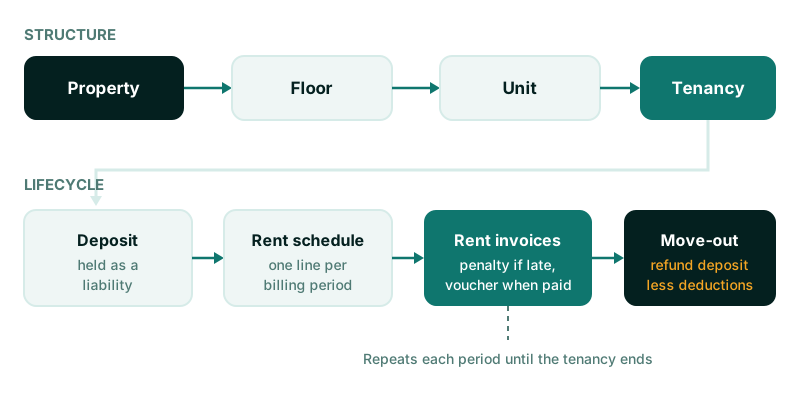
The structure that works in practice has four levels.
- Property: a building or site, with its address and owner.
- Floor: optional, but useful for multi-storey buildings where reporting by floor matters.
- Unit: the thing you actually let. A flat, an office suite, a shop or a parking bay. It carries size, type, status (vacant, let, under maintenance) and the standard asking rent.
- Tenancy: the agreement between a tenant and the unit, with start and end dates, rent, billing frequency, deposit and terms.
Keep the unit and the tenancy separate. A unit outlives many tenancies, and vacancy reporting depends on knowing which units have no active tenancy on a given date.
Properties as assets
If you own the buildings, linking each property to an asset record in Odoo Accounting lets you depreciate it and see its book value next to its rental income. Asset management in Odoo Accounting is an Enterprise feature, so a design built on it requires Enterprise. If you manage property for others, the buildings are not your assets and you skip this step.
Rent schedules
A rent schedule is the list of rent lines a tenancy will generate: one line per billing period, with the period dates, the amount and the invoice once raised.
Generating the schedule when the tenancy is confirmed has clear benefits:
- You can see future rent income for every unit before it is invoiced.
- Rent reviews are explicit. An increase from a given date changes the schedule lines from that date, rather than someone remembering to edit a recurring invoice.
- Invoices are raised from the schedule by a scheduled action, so nothing depends on a person running a monthly routine.
Decide early how to handle part periods at the start and end of a tenancy. Prorating by days is common, but your lease terms decide it. Also decide whether rent is invoiced in advance or in arrears, and on which day of the period.
Service charges and recurring maintenance
Many tenancies include a service charge or a fixed maintenance fee. Add these as separate lines on the rent invoice, using their own products and income accounts. That keeps rent income and service income apart in your reports and makes it easier to show tenants what they are paying for.
Deposits
Deposits are where property accounting most often goes wrong.
A tenant’s deposit is not income. It is money you owe back to the tenant, so it belongs in a liability account until the tenancy ends. Record it like this:
| Event | Debit | Credit |
|---|---|---|
| Deposit received | Bank | Tenant deposits held (liability) |
| Deduction agreed at move-out | Tenant deposits held | Income or the tenant’s receivable |
| Balance refunded | Tenant deposits held | Bank |
Practical points:
- Track the deposit against the tenancy, not just the tenant. A tenant with two units has two deposits.
- Record deductions with a reason and supporting documents, such as a move-out inspection report.
- Report deposits held by property each month. The total should match the liability account balance. If it does not, find out why before year end.
Local law may set rules on how deposits are held, for how long and when they must be returned. Check the rules that apply to you and design to them.
Landlords, owners and agents
If you manage property on behalf of owners, there is a second set of flows: rent collected for the landlord, your management fee or commission, and payouts to the landlord.
The model we recommend:
- Each property records its landlord.
- Rent collected is posted to income in the landlord’s name or to a landlord payable account, depending on your accounting policy and local rules.
- Your commission is calculated per tenancy or per property and shown as a deduction.
- The landlord receives a statement and a payout for the period, with any owner deposits or bills charged to them shown separately.
If you use letting agents, record their commission against the tenancy that earned it, so the cost of each letting is visible.
Arrears and late-payment penalties
Odoo’s payment follow-up handles reminders for overdue invoices. Penalties are a separate decision. If your leases allow a late-payment charge, define it precisely: a fixed fee or a percentage, after how many days, charged once or each period. Then generate it as its own invoice line or invoice, never by editing the original rent invoice. The original invoice must stay as issued.
Issue a rent voucher or receipt when payment is received. Tenants often need it as proof of payment, and it reduces queries to your accounts team.
Maintenance requests
Tenants report problems; someone has to fix them and someone has to pay. Link each maintenance request to the unit and, where relevant, the tenancy. Record who bears the cost: the landlord, the tenant or you. Recurring maintenance, such as a monthly cleaning or security charge, belongs on the rent invoice as described above. One-off repairs charged to a tenant become a separate invoice line.
Hosting and edition
A property management module is custom code, so it cannot run on Odoo Online. It needs Odoo.sh or a self-hosted server. If the design depends on assets, it also needs Enterprise. Our post on choosing Odoo Online, Odoo.sh or self-hosting explains the options. If landlord payouts and refunds need sign-off, the same design principles as a payment approval workflow apply.
Where we can help
Our Property Management add-on follows the model above: properties, floors and units, tenancies with rent schedules, deposits, landlords with owner deposits and rent bills, agent commissions, maintenance requests, recurring maintenance on rent invoices, late-payment penalties and rent vouchers. It is built on Odoo assets, so it requires Enterprise Accounting. If your portfolio is small enough for standard Odoo, we will tell you. Either way, our Odoo ERP implementation service can help you settle the accounting rules and set them up.